Showing posts with label How to Program in Perl. Show all posts

How to be a good Perl programmer

Now that we have learned a little about what Perl programming language is, let's tell you more about the art, the profession, or the hobby of programming in this wonderful language.

The Good Perl Programmer

It has a very famous slogan, which says that the good Perl programmer has three characteristics:

  1. It's lazy
  2. Impatient
  3. Hubris (in the sense of being arrogant)

Sounds like three bad things, doesn't it? But calm down, let's explain this story better.

A lazy person wants to do little work, try as little as possible.
So a good Perl programmer will try to do something, solve the problem as easily as possible, striving and rolling as little as possible to get rid of that problem right away.

There is even a famous phrase from Bill Gates that talks about it:

How to be a Good programmer

Impatient people don't want to do something the computer could be doing. After all, machines are for this: to do what we want, in a very quick way. So Perl programmers will avoid doing everything they can, and will delegate things to their scripts as much as possible.

You also have to be hubris. You have to want to share your code, show it to the community, to colleagues.

Obviously, you will not show an ugly, confusing script ... you will want to show something beautiful, simple, straightforward ... do in 10 lines what someone else did using 50.

Others also have to understand what you have done.
So you should also search in a readable, easily understandable way by others.
You have to want to show your work to others.

How to be a good Perl programmer

Another well-known phrase in the Perl world is:
There is more than one way to do it

It's such a flexible language that you'll never find two Perl scripts alike.
Perl programs are like a fingerprint, each one is different and is the face of its creator.

What will define you as a good programmer is your initial study here at Progressive Perl.
There is no right and wrong way to make code, there are ways and ways, so it is important here in the beginning to get you started, to make good code.

So for the rest of the course, read carefully, calmly, without haste.
Make sure you get everything right, it makes sense in your head.

Don't decorate, learn. It has to make sense, you have to understand what you are doing, what is happening and why.

Read here, do internet searches, visit forums, ask on social networks or here in the site comments. It is part of learning.

And the main thing: make the codes, write, type.
It's good to watch videos ... but just watching or reading will never make you a programmer.

Put your hand in the code, type, make mistakes, rewrite, that's how you learn.

By the way, it's important to persist.
Study. Did not understand? Read again. Nothing yet? Research, ask questions.

Going to do an exercise, can't you? Try again.
Nothing ? Try one more time.
At square zero? Go out, have a coffee, watch a youtube video, come back and try again.

A big, ugly, confusing code come out?
That's the way, little by little you get better.

Do you want to give up, do something else?
Relax your head, this is extremely normal, it happens to everyone.
The important thing is to go back to study, go back and try to solve the problem again.

Programming is that, solving problems, using creativity, programming is 99% transpiration and 1% inspiration.

Those guys who make wonderful code, in a few lines, without any mistake, did not reach that point overnight, no one is born knowing that.

It was sweating, grating, studying, trying again to make the script work, was reading code from others, asking, asking questions ...

OK?
Let's get our hands dirty?

Now, let's learn how to create our first Perl program in the next tutorial.

How to Program in Perl - Hello, world!

Now that we have introduced you to the Perl programming language, let's show you what you need to do to actually start programming in Perl.

That is, let's see what you have to do, download, where to write, how to run and everything.

How to install Perl

First step is obviously installing Perl.
If you are using a Unix system such as Linux, it already has Perl installed by default.

Linux is by far the best operating system for programmers. It's not difficult or complex, nor does it have to be a genius or hacker to use Linux.
In fact, I find it even easier and more intuitive to use Linux.

If you want to take the programming profession seriously, I suggest you install some Linux distribution, such as Ubuntu, and start learning.

Remember, everyone knows how to use Windows or Mac, there's nothing much about it, even my grandmother uses it.

But knowing how to use Linux is a tremendous and interesting differentiator, it will automatically put you in front of so many programmers and IT professionals.

Open the command terminal and type: perl -v
And it will open the version of your Perl.

For those who use another platform, such as Windows, visit the official website of the language:
https://www.perl.org/
Then go to download and get started.

Choose your platform.
If it's Windows, you'll probably have two options: ActiveState Perl and Strawberry.
Choose the Strawberry version.

Download the executable, wait for the download, run as administrator and install Perl.

How to Program the First Perl Script

Open a text editor, it can be notepad.

If you prefer, we even suggest using some Notepad ++ or Sublime , as they will make your code better formatted, organized, colorful and such, a beauty only.

Enter the simple command:

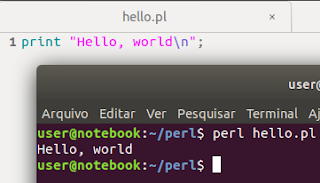
print "Hello, world \n";

Now save your file with the name: hello.pl
It is very important to have the extension pl, from Perl, ok?

Beware that sometimes notepad may want to save as: hello.pl.txt
Do not let it happen.

We suggest saving to folder: C:\perl
So your script address will be: C:\perl\hello.pl

How to run scripts in Perl

Open the command terminal, MS DOS or Linux shell.
If you are on Windows, type:
cd C:\perl

On my Linux, I saved in:
/home/user/perl

Now that it is in the script folder/directory, give the command Perl interpret:
perl hello.pl

If not working test: perl -w hello.pl on Windows
The result is this:

How to program in Perl


And ready, the message will appear on the screen: Hello, world

If you did it, you're already officially a Perl programmer, after all, you've already made and run your first script.

The hash-bang line in Linux and Windows

If you are using a Unix system such as Linux or Mac, it may be interesting to make your Perl script executable.

Come on, first make your hello.pl script executable:
chmod +x hello.pl

Now run it:
./hello.pl

And see that there will be an error.
This is because the terminal will try to read and interpret the content, and will use (usually) bash to interpret these commands.

But we don't want the shell to interpret this, but Perl.
For that, we use the very first line of Perl code, the hash-bang command, see how our code looks:
#!/usr/bin/perl
print "Hello, world!\n";
We added to the script the code: #! / Usr / bin / perl (called hash-bang)
Ready. The first line tells the shell interpreter that we want Perl to interpret the script!

In other plataform, like Windows, the shebang would be:
#!C:\perl\bin\perl.exe
print "Hello, world!\n";
Now try to run and see the message "Hello world!" beautiful on the command terminal screen.

Sublime Text IDE

Now that you have learned how to install, program, and run our scripts, let's learn a 'trick' that uses an IDE, or a cuter program to program.

We will use Sublime Text. Search for it on Google and choose to use, download and install.
Open the Sublime Text program and go to:: Tools -> Build System -> New Build System

Type the following command in the file that will appear:
{
    "cmd": ["perl", "-w", "$file"],
    "file_regex": ".* at (.*) line ([0-9]*)",
    "selector": "source.perl"
}

Save like: "Perl.sublime-build" in "~/.config/sublime-text-3/Packages/User" Sublime folder.

Now open a new file, save as hello.pl and do control + B to run the script.
The result will appear below.

How to program in Perl using Sublime Text editor IDE

See how cute and clean the program is, it will help you indent the code (give spacing and line breaks correctly), as well as color commands, strings, etc., and run the code directly there without having to give any commands.

A real hand on the wheel programming in Perl in the Sublime Text.