Showing posts with label Basic Perl. Show all posts

Numbers and Mathematical Operations in Perl

In this tutorial from our Progressive Perl tutorial, we will learn how to handle numbers and mathematical operations.

Perl numeric data types

Perl supports a wide range of numeric values, such as:
2112                     # integer
-2112                    # negative integer
12345.67              # float or decimal
6.02E23               # in scientific notation
0xffff                   # hexadecimal always starts with 0x
0377                    # octal always starts with 0
0b10011101        # binary starts with 0b
4_294_967_296  # big numbers arranged by underline

Internally, however, Perl works as if they were all float type, with double precision.
That is, it does not have a value of 7 but a 7.0, for example.
If you've studied languages like C, C ++, or Java, for example, it's like Perl treats all numbers as double.

Mathematical Operations in Perl

The computer is nothing but a calculator, very fast and that makes several calculations at the same time. So, let's use Perl a bit to make our machine calculate?

The main mathematical operations are:

  • addition: using the + operator
  • subtraction: using the - operator
  • multiplication: using the * operator (asterisk and not x)
  • division: using the / operator
  • exponentiation: using the operator **
  • remainder of division or module: using operator %


Let's make a simple script that takes two numbers, 21 and 12, and does all these operations:
#!/usr/bin/perl
print 21 + 12, "\n"; # Addition
print 21 - 12, "\n"; # Subtraction
print 21 * 12, "\n"; # Multiplication
print 21 / 12, "\n"; # Division
print 21 **12, "\n"; # Exponentiation
print 21 % 12, "\n"; # Remainder
The result
Operações matemáticas no Perl

Note that Perl directly printed the result of the operations, he read and interpreted that these were operations and solved them, showing the resulting value.

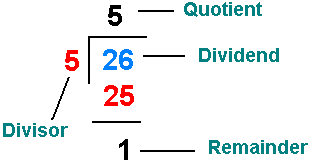
Remembering that rest of the division is that 'rest' that was left over when you made division bins at school:
Perl tutorial


Note that at the end of each line is a hash symbol # and something written.
The name of this is comment, it is only for programmers to read, Perl totally ignores it, ok? It's just to better explain and organize Perl scripts.

Operator Precedence

Calculate, head on, the following operation:

  • 1 + 2 * 3


For some the result may be 9: 1 + 2 = 3, 3 * 3 = 9
For others it may be 7: 2 * 3 = 6, 1 + 6 = 7

So what's the right?
Let's let Perl solve:
#!/usr/bin/perl
print (1 + 2 * 3);
And the result he shows is 7. And the reason is the precedence of operators.

The multiplication operator has higher precedence in the operation.
Now create a script to calculate:

  • (1 + 2) * 3

#!/usr/bin/perl
print ( (1 + 2)*3 );
See that the result was 9. Changed just for a couple of parentheses, check?
This is because parentheses have a higher precedence than the multiplication operator.

There is an importance table of operator precedence.
It is (top to bottom, and in the same line from left to right):
( )
++ --
**
*   /   %
+   -
<   <=   >   >=
==   !=
=   +=   -=   *=   /=   %=   **=

Operators you don't know, don't worry, let's study calmly throughout our Perl course tutorials.

Printing Information on Screen: PRINT and SAY in Perl

In this Perl tutorial, we will learn how to display information on the command terminal using Perl's print and say functions.

Printing information on the command terminal

Printing, for us, is very reminiscent of making a print on a printer, right?
In fact, it is a broader term, means to display.

So when we talk about printing, we are simply showing some information, a text, a number or anything.

This is the first way we will learn about how to exchange information between the machine and the person using it. All commands and operations occur 'hidden' on your computer hardware, so we use some command that displays these results to us.

The most common ways of displaying information data are through the print and say functions in Perl, which simply show the information we want on the command terminal screen, let's learn how to use it?

print function in Perl

This function (command that does something specific) we already used in the tutorial on how to program the script Hello world! in Perl.

Just type the print command and type anything in double or single quotation marks and end the command with a semicolon;

Ready. What you typed in the quotation marks will appear on the screen.
These texts, in Perl, are called strings.

Test:
#!/usr/bin/perl
print "Progressive Perl tutorial";
The result will be:
Progressive Perl tutorial

But it got ugly, because it was 'pasted' with a command line text.

Line break character: \n

To solve this problem, just hit the enter symbol.
Enter symbol, in computing, is symbolized by: \n

Whenever Perl reads this command, it gives a jump, a line break.

Try it:
#!/usr/bin/perl
print "Progressive Perl tutorial \n";
The result is what we saw in the last tutorial, much cuter and more organized, isn't it?

And to display the result below:
Free, complete and online Perl tutorial

How would you program the Perl script?
You can do so much:
#!/usr/bin/perl
print "Welcome to: \n";
print "Progressive Perl \n";
Like all in one line, see:
#!/usr/bin/perl
print "Welcome to:\nProgressive Perl\n";

SAY function in Perl

Programmer is a lazy people. He likes to do everything as quickly, simply and economically as possible, the less work the better.

As if the print function was no longer simple enough, they invented the say function.

Change print by say and see the result:
#!/usr/bin/perl
use v5.010;
say "Progressive Perl tutorial";
Have you noticed?
It automatically gives the line break at the end, no need to use the line break \ n character.

Nice, isn't it?

PRINT exercises in Perl

1. Phrase on screen - Implement a program that writes the phrase "The first program we never forget!"

2. Etiquette - Design a program that writes your full name on the first line, your address on the second, and zip code and phone number on the third.

3. Lyrics - Make a program that displays on the screen a lyrics you like (forbidden lyrics by Justin Bieber).

4. Message - Write a message to a person you like. Implement a program that prints this message, prints it out, and sends it to this person. Say it was a virus that a hacker installed on your computer.

5. To the site - Make a program that shows on screen what you want to do using your Perl skills.

6. Square - Write a program that shows the following figure:

XXXXX
X   X
X   X
X   X
XXXXX

7. Gradebook - You were hired by a school to make the student report card system. As a first step, write a program that produces the following output:
Student          Grade
=========         =====
BRUCE              9.0  
STEVE              DEZ
DAVE               4.5    
NICKO              7.0

8. Large Letter - Design a program to produce the letter P of Progressive Perl. If it were ‘L’, would be like this:
L
L
L
LLLLL

9. Menu - Design a program that shows the following menu on the screen:
Customer base
0 - End
1 - Includes
2 - Alter
3 - Excludes
4 - Consultation
Option:

10. Pine - Implement a program that draws a "pine" on the screen, similar to the one below.

Enrich the design with other characters by simulating embellishments.
       X
      XXX
     XXXXX
    XXXXXXX
   XXXXXXXXX
  XXXXXXXXXXX
 XXXXXXXXXXXXX
XXXXXXXXXXXXXXX
       XX
       XX
      XXXX

Write your scripts in the comments!

How to Program in Perl - Hello, world!

Now that we have introduced you to the Perl programming language, let's show you what you need to do to actually start programming in Perl.

That is, let's see what you have to do, download, where to write, how to run and everything.

How to install Perl

First step is obviously installing Perl.
If you are using a Unix system such as Linux, it already has Perl installed by default.

Linux is by far the best operating system for programmers. It's not difficult or complex, nor does it have to be a genius or hacker to use Linux.
In fact, I find it even easier and more intuitive to use Linux.

If you want to take the programming profession seriously, I suggest you install some Linux distribution, such as Ubuntu, and start learning.

Remember, everyone knows how to use Windows or Mac, there's nothing much about it, even my grandmother uses it.

But knowing how to use Linux is a tremendous and interesting differentiator, it will automatically put you in front of so many programmers and IT professionals.

Open the command terminal and type: perl -v
And it will open the version of your Perl.

For those who use another platform, such as Windows, visit the official website of the language:
https://www.perl.org/
Then go to download and get started.

Choose your platform.
If it's Windows, you'll probably have two options: ActiveState Perl and Strawberry.
Choose the Strawberry version.

Download the executable, wait for the download, run as administrator and install Perl.

How to Program the First Perl Script

Open a text editor, it can be notepad.

If you prefer, we even suggest using some Notepad ++ or Sublime , as they will make your code better formatted, organized, colorful and such, a beauty only.

Enter the simple command:

print "Hello, world \n";

Now save your file with the name: hello.pl
It is very important to have the extension pl, from Perl, ok?

Beware that sometimes notepad may want to save as: hello.pl.txt
Do not let it happen.

We suggest saving to folder: C:\perl
So your script address will be: C:\perl\hello.pl

How to run scripts in Perl

Open the command terminal, MS DOS or Linux shell.
If you are on Windows, type:
cd C:\perl

On my Linux, I saved in:
/home/user/perl

Now that it is in the script folder/directory, give the command Perl interpret:
perl hello.pl

If not working test: perl -w hello.pl on Windows
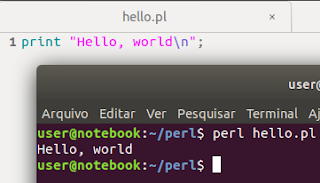
The result is this:

How to program in Perl


And ready, the message will appear on the screen: Hello, world

If you did it, you're already officially a Perl programmer, after all, you've already made and run your first script.

The hash-bang line in Linux and Windows

If you are using a Unix system such as Linux or Mac, it may be interesting to make your Perl script executable.

Come on, first make your hello.pl script executable:
chmod +x hello.pl

Now run it:
./hello.pl

And see that there will be an error.
This is because the terminal will try to read and interpret the content, and will use (usually) bash to interpret these commands.

But we don't want the shell to interpret this, but Perl.
For that, we use the very first line of Perl code, the hash-bang command, see how our code looks:
#!/usr/bin/perl
print "Hello, world!\n";
We added to the script the code: #! / Usr / bin / perl (called hash-bang)
Ready. The first line tells the shell interpreter that we want Perl to interpret the script!

In other plataform, like Windows, the shebang would be:
#!C:\perl\bin\perl.exe
print "Hello, world!\n";
Now try to run and see the message "Hello world!" beautiful on the command terminal screen.

Sublime Text IDE

Now that you have learned how to install, program, and run our scripts, let's learn a 'trick' that uses an IDE, or a cuter program to program.

We will use Sublime Text. Search for it on Google and choose to use, download and install.
Open the Sublime Text program and go to:: Tools -> Build System -> New Build System

Type the following command in the file that will appear:
{
    "cmd": ["perl", "-w", "$file"],
    "file_regex": ".* at (.*) line ([0-9]*)",
    "selector": "source.perl"
}

Save like: "Perl.sublime-build" in "~/.config/sublime-text-3/Packages/User" Sublime folder.

Now open a new file, save as hello.pl and do control + B to run the script.
The result will appear below.

How to program in Perl using Sublime Text editor IDE

See how cute and clean the program is, it will help you indent the code (give spacing and line breaks correctly), as well as color commands, strings, etc., and run the code directly there without having to give any commands.

A real hand on the wheel programming in Perl in the Sublime Text.