Showing posts with label Introduction to Perl. Show all posts

Perl Variables - What They Are and How to Use

In this Perl tutorial, we will learn what variables are, what they are for, how they work, and how to use them. Also, let's meet the vigil, $ symbol, and assignment operator =

Storing Information in Perl

When you select a piece of text in some editor, you can paste it later as many times as you like. If the computer stays on for 10 years, you can still paste after 10 years.

When you play a game and lose when you failed some stage, you return to the same level with the same and items you have collected.

When you listen to music on your phone, stop listening, and then listen again (no matter how long later), you come back to the exact same point as before.

So, does the editor guess what you copied? Does the music app guess which song and where you stopped listening? Obviously not, if they know this information is because it was stored, saved somewhere.

Storing and using saved information is one of the cornerstones of programming, and we will now learn, in Perl programming, how to store information to use throughout our scripts.

In the future we will learn how to store values ​​in text files, for example.

This saves you information that will be permanently written to your machine even after your script has finished executing.

Perl variable: How to declare and initialize

Let's first learn how to store information temporarily, that is, during the duration of our Perl scripts execution, and only 'scalar' type information (we will study other types of information later, such as Hashes and Arrays).

This information storage is because the variables.
Variable is nothing more than that: a thing that stores data.

Every scalar type variable (such as numbers and strings) has a name and begins with the $ (vigil) symbol. Unlike other languages, in Perl you don't have to declare variables beforehand, you can quickly use them without wasting time, and you don't have to say what kind of information you want to store.

For example, let's store the number 2112 in the name variable number:

  • $number = 2112;


That's it. The $ symbol, a name, the assignment operator (=), and the information you want to initially store.

But what is the use of this? What is the purpose of using variables in Perl?
Let's find out.

Variables: What are they for?

When we declare a variable, Perl goes there and reserves a block in your computer's memory.
For example, it might reserve block number: 0x34671FF

But hey, programming is supposed to be easy and simple ... keep using this ugly number is not cool, do you agree? And if instead of calling 0x34671FF we could call by an easier name, what do we choose?

How about calling $number?
Every time we use the  number variable, Perl understands that you are referring to the value stored at position 0x34671FF in your memory.

Perl Variable: How to Use

Declare and initialize an age variable with the value of its age.
For example:

  • $age = 20;

Now let's make a script that prints the text on the screen: "You're [your age] years old."
In Perl, it looks like this:
#!/usr/bin/perl

$age=20;
print "You're $age years old\n";
Note that the "$age" did not appear on the screen, but a number.

That is, Perl interpreted, he thinks:
- "Oops! Here is a thing starting with the $symbol, so it's a variable ... instead of printing the variable name, I'll print the value it stores ... let me search here what is there at that address from memory".


And bang, it prints the number you initially stored in the variable:
How to programming in Perl - Tutorials

We're working with strings and variables, we can do that using the concatenation operator as well:
#!/usr/bin/perl

$age=20;
print "Your age is: ".$age."\n";
Note that we do not need to put quotation marks around the variable name.

Now let's store a string in a variable.
Enter your name in the $ name variable, for example:

  • $ name = 'Neil Peart';

Now a script that gives you good morning:
#!/usr/bin/perl

$name = 'Neil Peart';
print "Good morning, $name\n";

We can do this too:
#!/usr/bin/perl

$name = 'Neil Peart';
print "Good morning, ", $name;

And until then:
#!/usr/bin/perl

$name = 'Good morning, Neil Peart';
print $name;
This Perl is really very flexible, don't you think?

Perl Variable Exercises

"Write a script that has a variable that stores any numeric value and displays the twice."

Let's store the number 2112 in the $num variable.
In the $doub variable, we store twice the $num (just multiply this by two).

See how our script looks:
#!/usr/bin/perl

$num = 2112;
$doub = 2 * $num;
print "Twice of ", $num, " is ", $doub;

"Make a script that stores the numbers 21 and 12 in two different variables and displays their sum"

Let's store in the variables $num1 and $num2, each value.
In the $sum variable we will store the sum ($num1 + $num2), see:
#!/usr/bin/perl

$num1 = 21;
$num2 = 12;
$soma = $num1 + $num2;
print "Sum: $soma";

You could also do it directly in print:
#!/usr/bin/perl

$num1 = 21;
$num2 = 12;
print "Sum: ", ($num1+$num2);

The above way is more efficient as it declares only two variable.
We can also use just one variable, already starting with the sum directly:
#!/usr/bin/perl

$num = 21+12;
print "Soma: $num";

Do you understand now why Perl's motto is "There are always several ways to do the same thing"?

"Write a script that initializes with two variables with two values. Then show the sum, subtraction, multiplication, division, and remainder of the division of the first by the second number."

This we leave with you, write your script in the comments.

Numbers and Mathematical Operations in Perl

In this tutorial from our Progressive Perl tutorial, we will learn how to handle numbers and mathematical operations.

Perl numeric data types

Perl supports a wide range of numeric values, such as:
2112                     # integer
-2112                    # negative integer
12345.67              # float or decimal
6.02E23               # in scientific notation
0xffff                   # hexadecimal always starts with 0x
0377                    # octal always starts with 0
0b10011101        # binary starts with 0b
4_294_967_296  # big numbers arranged by underline

Internally, however, Perl works as if they were all float type, with double precision.
That is, it does not have a value of 7 but a 7.0, for example.
If you've studied languages like C, C ++, or Java, for example, it's like Perl treats all numbers as double.

Mathematical Operations in Perl

The computer is nothing but a calculator, very fast and that makes several calculations at the same time. So, let's use Perl a bit to make our machine calculate?

The main mathematical operations are:

  • addition: using the + operator
  • subtraction: using the - operator
  • multiplication: using the * operator (asterisk and not x)
  • division: using the / operator
  • exponentiation: using the operator **
  • remainder of division or module: using operator %


Let's make a simple script that takes two numbers, 21 and 12, and does all these operations:
#!/usr/bin/perl
print 21 + 12, "\n"; # Addition
print 21 - 12, "\n"; # Subtraction
print 21 * 12, "\n"; # Multiplication
print 21 / 12, "\n"; # Division
print 21 **12, "\n"; # Exponentiation
print 21 % 12, "\n"; # Remainder
The result
Operações matemáticas no Perl

Note that Perl directly printed the result of the operations, he read and interpreted that these were operations and solved them, showing the resulting value.

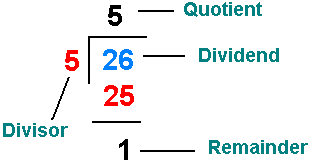
Remembering that rest of the division is that 'rest' that was left over when you made division bins at school:

Perl tutorial


Note that at the end of each line is a hash symbol # and something written.
The name of this is comment, it is only for programmers to read, Perl totally ignores it, ok? It's just to better explain and organize Perl scripts.

Operator Precedence

Calculate, head on, the following operation:

  • 1 + 2 * 3


For some the result may be 9: 1 + 2 = 3, 3 * 3 = 9
For others it may be 7: 2 * 3 = 6, 1 + 6 = 7

So what's the right?
Let's let Perl solve:
#!/usr/bin/perl
print (1 + 2 * 3);
And the result he shows is 7. And the reason is the precedence of operators.

The multiplication operator has higher precedence in the operation.
Now create a script to calculate:

  • (1 + 2) * 3

#!/usr/bin/perl
print ( (1 + 2)*3 );
See that the result was 9. Changed just for a couple of parentheses, check?
This is because parentheses have a higher precedence than the multiplication operator.

There is an importance table of operator precedence.
It is (top to bottom, and in the same line from left to right):
( )
++ --
**
*   /   %
+   -
<   <=   >   >=
==   !=
=   +=   -=   *=   /=   %=   **=

Operators you don't know, don't worry, let's study calmly throughout our Perl course tutorials.

Printing Information on Screen: PRINT and SAY in Perl

In this Perl tutorial, we will learn how to display information on the command terminal using Perl's print and say functions.

Printing information on the command terminal

Printing, for us, is very reminiscent of making a print on a printer, right?
In fact, it is a broader term, means to display.

So when we talk about printing, we are simply showing some information, a text, a number or anything.

This is the first way we will learn about how to exchange information between the machine and the person using it. All commands and operations occur 'hidden' on your computer hardware, so we use some command that displays these results to us.

The most common ways of displaying information data are through the print and say functions in Perl, which simply show the information we want on the command terminal screen, let's learn how to use it?

print function in Perl

This function (command that does something specific) we already used in the tutorial on how to program the script Hello world! in Perl.

Just type the print command and type anything in double or single quotation marks and end the command with a semicolon;

Ready. What you typed in the quotation marks will appear on the screen.
These texts, in Perl, are called strings.

Test:
#!/usr/bin/perl
print "Progressive Perl tutorial";
The result will be:
Progressive Perl tutorial

But it got ugly, because it was 'pasted' with a command line text.

Line break character: \n

To solve this problem, just hit the enter symbol.
Enter symbol, in computing, is symbolized by: \n

Whenever Perl reads this command, it gives a jump, a line break.

Try it:
#!/usr/bin/perl
print "Progressive Perl tutorial \n";
The result is what we saw in the last tutorial, much cuter and more organized, isn't it?

And to display the result below:
Free, complete and online Perl tutorial

How would you program the Perl script?
You can do so much:
#!/usr/bin/perl
print "Welcome to: \n";
print "Progressive Perl \n";
Like all in one line, see:
#!/usr/bin/perl
print "Welcome to:\nProgressive Perl\n";

SAY function in Perl

Programmer is a lazy people. He likes to do everything as quickly, simply and economically as possible, the less work the better.

As if the print function was no longer simple enough, they invented the say function.

Change print by say and see the result:
#!/usr/bin/perl
use v5.010;
say "Progressive Perl tutorial";
Have you noticed?
It automatically gives the line break at the end, no need to use the line break \ n character.

Nice, isn't it?

PRINT exercises in Perl

1. Phrase on screen - Implement a program that writes the phrase "The first program we never forget!"

2. Etiquette - Design a program that writes your full name on the first line, your address on the second, and zip code and phone number on the third.

3. Lyrics - Make a program that displays on the screen a lyrics you like (forbidden lyrics by Justin Bieber).

4. Message - Write a message to a person you like. Implement a program that prints this message, prints it out, and sends it to this person. Say it was a virus that a hacker installed on your computer.

5. To the site - Make a program that shows on screen what you want to do using your Perl skills.

6. Square - Write a program that shows the following figure:

XXXXX
X   X
X   X
X   X
XXXXX

7. Gradebook - You were hired by a school to make the student report card system. As a first step, write a program that produces the following output:
Student          Grade
=========         =====
BRUCE              9.0  
STEVE              DEZ
DAVE               4.5    
NICKO              7.0

8. Large Letter - Design a program to produce the letter P of Progressive Perl. If it were ‘L’, would be like this:
L
L
L
LLLLL

9. Menu - Design a program that shows the following menu on the screen:
Customer base
0 - End
1 - Includes
2 - Alter
3 - Excludes
4 - Consultation
Option:

10. Pine - Implement a program that draws a "pine" on the screen, similar to the one below.

Enrich the design with other characters by simulating embellishments.
       X
      XXX
     XXXXX
    XXXXXXX
   XXXXXXXXX
  XXXXXXXXXXX
 XXXXXXXXXXXXX
XXXXXXXXXXXXXXX
       XX
       XX
      XXXX

Write your scripts in the comments!